Short answer: if you’re after a PeekYou alternative because the site stopped showing results, it isn’t your browser. On September 30, 2026, every peekyou.com address we opened — a name-search page and the old opt-out page included — showed the same notice: the domain is now controlled by Atlas Data Privacy Corporation, after a New Jersey lawsuit that the notice says has been settled. Sites like PeekYou that still take a username or an email address include IDCrawl, Social Catfish and Spokeo.
Recordwell accepts a first and last name, an @username or a supported public-profile link. Include @ before a username; a handle without it is not accepted. There is no email, phone or photo lookup, and a result does not prove account ownership. Everything said below about other sites comes from their own pages, read the same day.
What happened to PeekYou
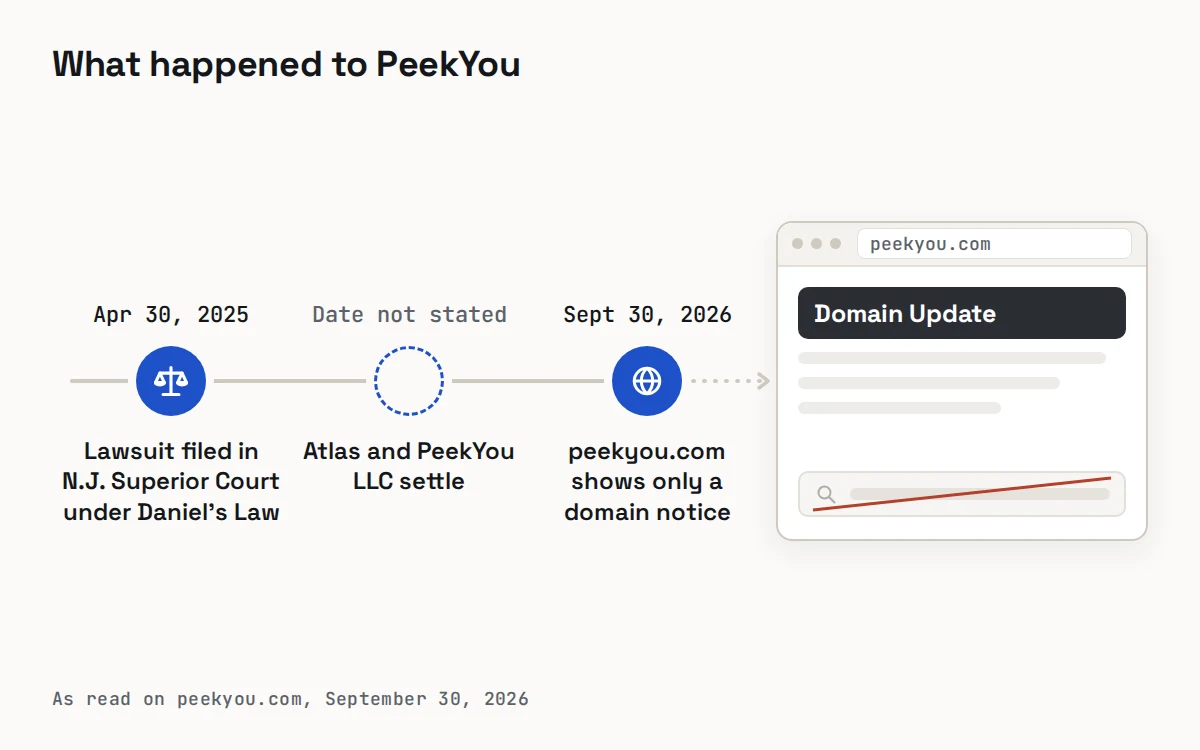
The notice on peekyou.com names the case: Atlas Data Privacy Corporation, et al. v. PeekYou LLC, et al., filed on April 30, 2025 in the Superior Court of New Jersey, Law Division, Essex County. It says Atlas brought claims assigned to it by roughly 21,700 law enforcement officers, prosecutors and other covered persons under Daniel’s Law.
Daniel’s Law, enacted in New Jersey in 2020, bars disclosing the home address or unpublished home telephone number of active, formerly active and retired judicial officers, prosecutors and law enforcement officers, and extends that protection to family members who live with them. The text of the law is on the New Jersey Legislature’s website.
According to the notice, Atlas and PeekYou LLC have entered into a settlement and the lawsuit is resolved. The notice doesn’t say whether PeekYou will come back somewhere else, so be wary of any site presenting itself as the new PeekYou until it shows who runs it.
Sites like PeekYou, by the clue you have
If you used PeekYou to connect a name or a handle to social accounts, the closest replacements are the sites that still accept those clues. Start from whatever you actually have in hand:
| Your clue | Sites that list a search for it | What to watch for |
|---|---|---|
| A username or handle | IDCrawl and Social Catfish (username search); Spokeo (type it into the email search) | Unrelated people use the same handle, and handles are reassigned |
| An email address | IDCrawl, Social Catfish and Spokeo | Addresses are shared or abandoned; a match shows a link, not a person |
| A photo | Social Catfish (photo search) | Pictures are copied constantly; a match may lead to a stolen image |
| A first and last name | IDCrawl’s people search; Recordwell, which keeps people who share a name apart | A common name needs two independent details, such as an age range and a city |
| A phone number | IDCrawl, Intelius or Whitepages (reverse phone) | Numbers change hands; check how old each entry is |
What each one says about itself. IDCrawl describes itself as a free people search engine that organizes social media profiles and other open web information. Social Catfish takes a name, phone, email, photo, username or address and lets you preview matches before a paid plan. Spokeo says it links public profiles mainly through an email or username, and that private profiles may not appear. IDCrawl and Spokeo state that they are not consumer reporting agencies, and Social Catfish that it isn’t a consumer credit reporting agency, so none of them may be used to screen a tenant or an employee.
A name you may see on older lists. Pipl often appears next to PeekYou in lists of alternatives. Its own site now presents it as an identity and fraud service for enterprises and investigators, not a consumer search.
For phone, address and membership services, the Spokeo alternatives comparison goes further.
How to check a username without a people-search site
You can trace a handle yourself, and a careful manual pass often tells you more, because you see each profile in context:
- Search the exact handle in quotation marks on a general search engine, then again with a platform’s name added.
- Use each platform’s own search box for the handle and for the display name.
- Open every candidate while signed out, so you see only what the public sees.
- Look for connections the account holder made: a personal site in the bio, or one profile linking to another.
- Compare how long each account has existed; years of ordinary posts read differently from an account opened a few weeks ago.
- Write down what matched and what conflicted before you conclude anything.
What a username match can and can’t prove
A matching handle feels like an answer, but it is only where checking starts. Before you treat two accounts as one person, make sure that:
- Two independent signals agree, such as a link the person posted and an employer you already knew.
- The signals don’t all trace back to one copied detail, like the same photo reposted on several sites.
- Nothing important conflicts: ages, places and dates fit a single life.
- You’ve checked whether other people use the same handle on other platforms.
- You’ve used only what is public — no fake follow requests and no attempts to get past privacy settings.
- What you plan to do with the answer is proportionate: a message, a report to the platform, or nothing.
Our explainer, what a username search finds and what it cannot, goes further, including how to review your own handles. If an account looks like it is impersonating someone, the platform’s own reporting route is the one that works.
If you were listed on PeekYou
PeekYou’s old opt-out address shows the same domain notice, so there is no form left to fill in there. A people-search listing is compiled from information held elsewhere, though, so the details PeekYou showed may still appear on social networks and on other people-search sites.
Start by seeing what a stranger sees. Search your own name while signed out and note every site that lists you. Recordwell’s self-check runs the same name search a stranger would.
Then opt out site by site. IDCrawl’s removal page asks for the link to your IDCrawl page and an email address, then sends a verification link. Social Catfish’s opt-out form asks for your first and last name and email and says your details come off sale within 15 days. Spokeo asks for each listing’s web address and a click on an emailed link. The FTC’s guide to people search sites that sell your information explains why the check is worth repeating from time to time.
Covered by Daniel’s Law? If you are a covered person in New Jersey, Recordwell has a separate Daniel’s Law notice form for withholding a protected home address or unpublished home telephone number. Anyone can use its ordinary removal form, which is free and needs no account.
Look for public profiles by name
How we checked PeekYou’s status
On September 30, 2026 we opened peekyou.com’s home page, a name-search address and its former opt-out address. All three returned the same “Domain Update” notice. We couldn’t load an archived copy of PeekYou’s old pages, so this guide doesn’t describe PeekYou’s former features in detail.
PeekYou alternatives: common questions
Is PeekYou still working?
Not at its old address. On September 30, 2026, peekyou.com showed only a notice that the domain is controlled by Atlas Data Privacy Corporation after a Daniel’s Law lawsuit in New Jersey, which the notice says was settled. Its search and opt-out addresses showed the same notice.
What is the closest alternative to PeekYou?
It depends on your clue. For a username, IDCrawl and Social Catfish list a username search, and Spokeo takes one in its email search. For a photo, Social Catfish lists a photo search. For a first and last name, a name-first search such as Recordwell keeps people who share the name apart.
Is there a free site like PeekYou?
IDCrawl describes itself as free to use and lists name, username, phone and email searches. Social Catfish and Spokeo let you start a search and preview results before you pay. Free or paid, a result still needs a second, independent detail before you rely on it.
Can Recordwell search by username?
No. Recordwell accepts a first and last name or a supported public-profile link and has no username, email, phone or photo lookup. If you know the person’s name, its profile search by name looks for publicly visible profiles and mentions connected to it.
Does the same username on two sites mean it’s the same person?
Not on its own. Handles are reused by strangers and reassigned when accounts close. Look for a second, independent signal — a link the person made from one account to the other, or an employer or city you already knew — before treating the accounts as one person.
How do I remove my information now that PeekYou’s site is offline?
There’s no PeekYou form to use, so work on the sites that still list you. Search your own name, use each site’s opt-out, keep a dated list of requests and search again after a few months. Removing yourself from Recordwell is free and needs no account.